
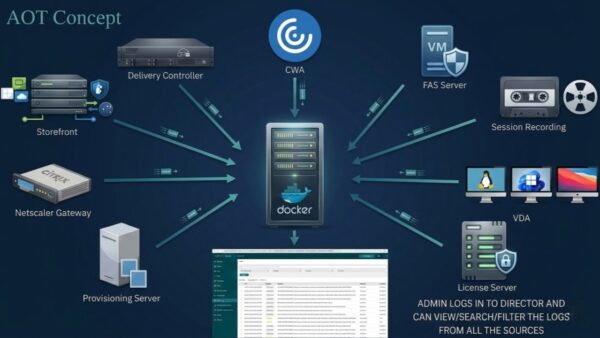
In the high-stakes world of Citrix administration, the phrase “It happened again, but I didn’t have a trace running” is the ultimate frustration. We’ve all been there: a user reports a session failure, but by the time you start a CDF trace, the issue is gone. Troubleshooting becomes a game of “wait and see.”
As we move into 2026, Always On Tracing (AOT) has evolved from a niche diagnostic tool into a cornerstone of a proactive “Observability” strategy. If you haven’t deployed it yet, you’re essentially flying blind.
 Why AOT is a Game-Changer (The Benefits)
While traditional CDF tracing is a “flashlight” you turn on when you’re already in the dark, AOT is the “floodlight” that’s always on. Here’s why it’s winning:
Zero-Reproduction Troubleshooting: You no longer need to ask a frustrated user to “try it again while I record.” The data for that previous failed login is already waiting for you.
True End-to-End Visibility: In the latest 2507/2511 releases, AOT coverage has expanded. You can now correlate logs across the entire Citrix stack
Massive Efficiency Gains: Traditional traces can be huge and impact performance. AOT uses LZ4 compression and circular memory buffers, providing deep insights with negligible CPU overhead.
Centralized Intelligence: No more remoting into individual VDAs to grab files. All logs are indexed in a central repository, searchable directly from the Citrix Director interface.
Historical Context: With 7-day default retention, you can perform “Monday Morning Quarterbacking” on issues that happened over the weekend without needing to recreate the environment state.
 Setting It Up: The 3-Step “Quick-Start”
We’ve moved away from complex manual installs. Configuring AOT in a modern CVAD site is now a streamlined process:
Deploy the Log Server: Install the AOT Log Server (available as a lightweight container or Windows installer). This acts as your central “Black Box” recorder.
Generate the Security Key: Run the GetAuthKey script on your Log Server. This ensures only authorized Citrix components can send data to your repository.
Point & Click in Web Studio: Navigate to Settings > Log Server.
 The Bottom Line
In 2026, the goal of IT is no longer just “uptime”, it’s MTTR (Mean Time To Resolution). By shifting from reactive logs to Always On Tracing, you aren’t just fixing bugs faster; you’re reclaiming hours of your team’s week.
Is your team still manually capturing CDF traces, or have you made the switch to Always On?
#VDI #CloudComputing #ITStrategy #Troubleshooting #DigitalWorkspace #CitrixAOT