
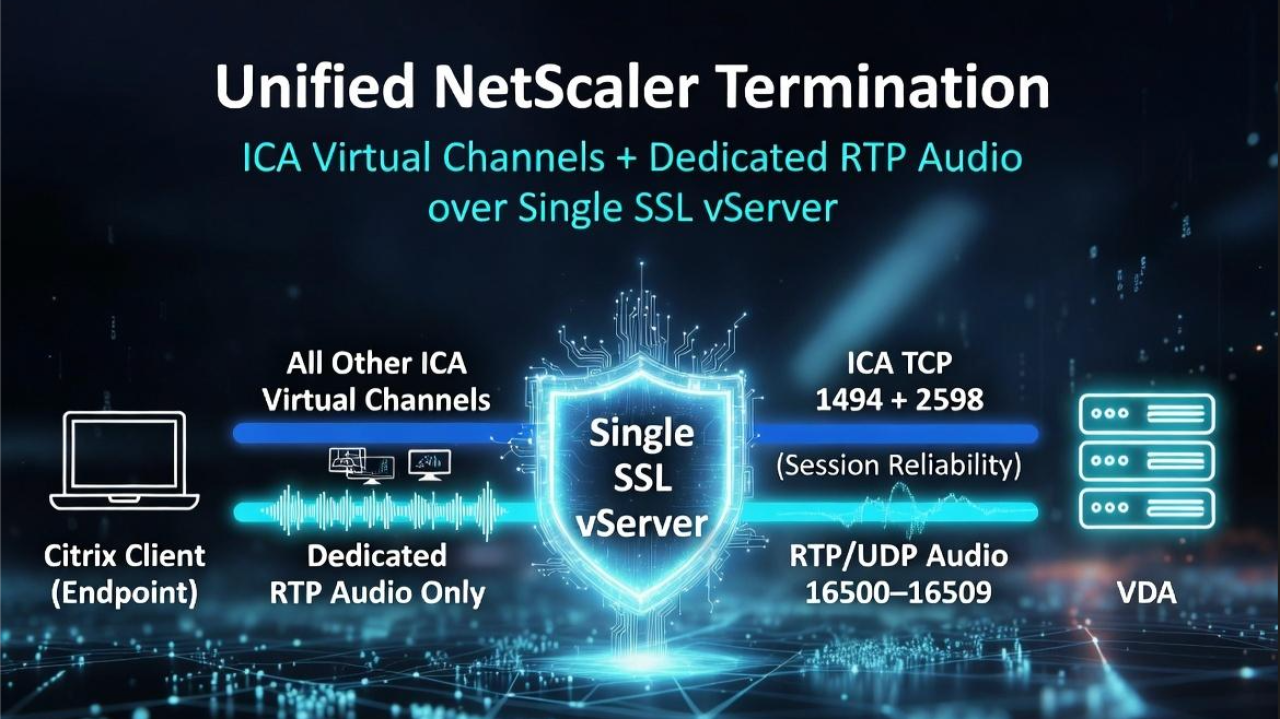

Intro: Setting the context
Citrix’s move toward EDT with loss-tolerant mode and Adaptive Audio has significantly improved audio resilience on ICA, especially over lossy networks. However, there are still use cases where classic RTP/UDP audio is not only relevant but required.
A common example is a generic softphone running inside the VDA, where there is:
- No endpoint-side optimization (true “generic” softphone inside the session)
- A requirement to offload audio from the main ICA channel
- A design choice to keep the main session on TCP while handling audio over separate RTP/UDP flows
In these scenarios, you want ICA running over TCP for the session control and graphics, while audio rides on dedicated RTP/UDP streams between endpoint and VDA. That means:
- EDT must be disabled for the ICA session
- RTP audio must be explicitly enabled on both client and VDA via Citrix policies
- NetScaler (if present) must support DTLS for UDP transport
- Network and firewalls must allow the appropriate UDP ports end‑to‑end
Step 1 – Forcing ICA to use TCP (disabling EDT)
Goal: ensure the session uses TCP transport so that RTP/UDP can be used exclusively for audio.
- Citrix Policy In Studio, create or edit a policy that controls session reliability / HDX transport. Disable or deprioritize EDT by: Setting the HDX Adaptive Transport policy “Off” Ensuring that “HDX Adaptive Transport” does not automatically switch sessions to UDP-based EDT on supported paths. Assign this policy to the relevant Delivery Groups or users that will use RTP audio.
- ICA file level (for testing or targeted control) For targeted troubleshooting or lab validation, edit the ICA file to disable EDT. This is useful when you want to validate behavior without impacting global policy.
- Client-side configuration For Citrix Workspace app / Receiver, use client-side configuration (GPO, wfica.ini, or registry, depending on platform) to: Disable EDT / UDP transport. Force sessions to use TCP only. This can be helpful in environments where you don’t control the Citrix policies centrally, but you do manage the client build.
Start with policy-based control in production, and use ICA/client tweaks only for diagnostics and edge cases.
Step 2 – Enabling RTP audio on client and VDA
Goal: separate audio from ICA and move it into RTP/UDP streams between client and VDA.
- Citrix Policy for RTP audio Enable the setting that turns on RTP audio between the client and VDA. Confirm the policy applies to the same scope as in Step 1 (Delivery Group / user group). UDP Audio also requires client-side configuration via GPO so the client is allowed to use RTP/UDP for audio and, when applicable, to traverse a Gateway. On managed endpoints this is normally handled by policy (which ultimately sets specific registry keys); on unmanaged or BYOD devices, similar behavior can be configured via the default.ica file in StoreFront by setting values such as:
- EnableRtpAudio=true
- RtpAudioLowestPort=16500
- RtpAudioHighestPort=16509
- EnableUDPThroughGateway=true
- Port behavior By default, RTP audio uses the UDP port range 16500–16509. The same range is used: As the source ports on the endpoint (client) As the listener/destination ports on the VDA This makes firewall rules and packet captures easier to read and explain.
- Verification checklist On the VDA, verify that the HDX audio/RTP service is listening on 16500–16509 UDP. On clients, confirm that their Workspace app supports RTP audio and that the feature is not blocked by local policies. Use basic tools (netstat/ss, packet capture) to confirm that audio is actually being negotiated over UDP rather than ICA.
Step 3 – NetScaler configuration (DTLS for RTP/UDP)
Goal: make sure NetScaler does not become the bottleneck when RTP/UDP audio traverses it.
- DTLS must be enabled on the SSL vServer If NetScaler is in the path (ICA Proxy, Gateway, etc.), the SSL virtual server handling the ICA connection must also support DTLS. DTLS effectively provides TLS-like security for UDP traffic, which is needed when RTP/UDP audio flows through the Gateway.
- Avoid separate DTLS-only vServers for RTP A key nuance: creating a separate DTLS vServer on the same IP and expecting it to carry RTP audio does not work for this scenario. The same SSL vServer (with the same VIP) that terminates ICA must have DTLS enabled to allow RTP audio to pass correctly.
- Validation On NetScaler, verify DTLS is enabled on the vServer (UI/CLI). Use packet capture on NetScaler to confirm UDP/DTLS flows on port 443 from client to VIP, and RTP/UDP to/from the VDA ports.
Important Note: Without DTLS enabled on the primary SSL vServer, RTP audio will fail even if all other settings and firewall rules look correct.
Step 4 – Network and firewall requirements
Goal: ensure end‑to‑end UDP connectivity for RTP audio.
- Source: Endpoint (Citrix client) using UDP source ports 16500–16509
- Middle: NetScaler SSL vServer VIP on UDP 443 (DTLS)
- Destination:VDA listening on UDP 16500–16500
Additional points to consider:
- Firewall openings Client-to-Gateway: allow UDP 443 to the NetScaler VIP. NetScaler-to-VDA: allow UDP 16500–16509 from NetScaler SNIP(s) to the VDA subnet. If there are intermediate firewalls, make sure they do not block or inspect/alter these UDP flows.
- QoS / network tuning (optional but useful in an article) If the environment supports QoS, consider tagging RTP audio traffic for higher priority. Mention that for VoIP-like workloads, consistent latency and jitter usually matter more than raw bandwidth.
- Troubleshooting tips If audio falls back to ICA/TCP, suspect: EDT not fully disabled, DTLS missing, or UDP ports blocked. Packet captures on client, NetScaler, and VDA help identify where the UDP flow stops.
This design proves that even in an EDT-first world, you can still carve out a clean, deterministic RTP/UDP path for voice when the use case demands it