Exploring NetScaler as Ingress Controller for OpenShift Cluster

Configuring Splunk Forwarder on Non-Persistent Citrix Desktops (MCS & PVS): Fixing Duplicate GUID Issues
March 23, 2026

Exploring NetScaler as Ingress Controller for OpenShift Cluster

Written by: Bhalchandra Chaudhari (March 3, 2026)
In today’s cloud-native landscape, Kubernetes has become a cornerstone for enterprises, especially with the rise of multi-cluster deployments. These architectures enhance disaster recovery, enable intelligent autoscaling, and strengthen identity management, providing organizations with greater resilience and flexibility. It automates deployment, scaling, and resilience while abstracting infrastructure complexity, enabling applications to be more agile, portable, and innovative making it a critical enabler for modern digital platforms. Complementing this, the NetScaler Ingress Controller (NSIC) adds enterprise-grade traffic management, security, and observability, providing advanced load balancing, application firewalling, and seamless integration with Kubernetes services to ensure reliable and secure application delivery in cloud-native deployments.
The NetScaler Ingress Controller (NSIC) supports multiple NetScaler form factors CPX, BLX, VPX, and MPX to efficiently manage and route traffic into Kubernetes clusters. By leveraging these capabilities, organizations can achieve high availability, improved resilience, and consistent performance across clusters.
NetScaler elevates Kubernetes ingress by delivering enterprise-grade traffic management through CRDs, including advanced rewrite and responder policies unavailable in native Kubernetes Ingress. It supports flexible topologies such as Single-Tier and Dual-Tier, ensuring smooth integration with Kubernetes environments. With NetScaler CPX, organizations can achieve advanced Layer 7 load balancing for East-West microservice traffic, surpassing Kubernetes’ default Layer 4 capabilities.

Understanding the Architecture

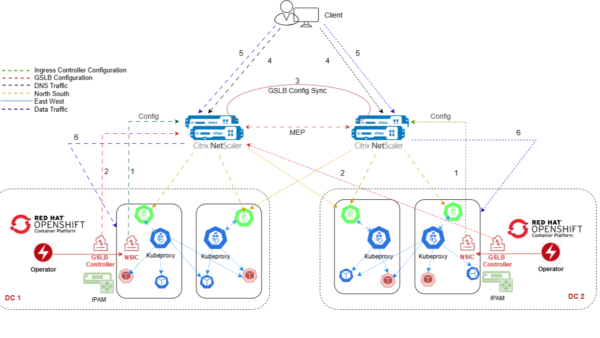
The architecture consists of two OpenShift clusters (DC 1 and DC 2), each with:
  • OpenShift Container Platform running applications.
  • NetScaler Ingress Controller (NSIC) managing ingress rules.
  • GSLB Controller handling DNS-based traffic distribution (Part 2).
  • IPAM Controller handling Ingress IP allocation.
  • NetScaler appliances acting as Tier-1 ingress points and synchronizing GSLB configuration.

Traffic Flow:

Ingress Configuration NetScaler Ingress Controller (NSIC) in both clusters configures ingress rules for exposed applications.
GSLB Entity Setup Each cluster’s GSLB controller configures GSLB entities on the primary site NetScaler (Hall 1). These include service groups, monitors, and DNS records.
GSLB Sync The GSLB configuration is synchronized automatically between the NetScaler’s deployed across datacenters over MEP (Metric Exchange Protocol).
DNS ResolutionA client’s DNS query for an application FQDN is directed to GSLB. Based on configured global traffic policies (round-robin, proximity, or availability), the GSLB resolves the query to an IP.
Client to Ingress VIPThe resolved IP corresponds to the ingress VIP on one of the NetScaler’s. The client’s traffic lands on this Tier-1 ingress point.
Application Access The NetScaler forwards the request to the appropriate OpenShift cluster, where it reaches the application service pods via NSIC and kube-proxy, responsible for routing requests within clusters that allow services to communicate with pods.
Deployments Prerequisites:
  • NetScaler ANY form factor, VPX, MPX, BLX (use existing NetScaler ADC available in the environment or set up VPX easily on compatible hypervisor. (For this setup, VPX 3000 is used).
  • Configure two SNIP IPs on each NetScaler for traffic management.
  • Keep free VIPs available to expose OpenShift applications externally.
  • Ensure SNIP-to-SNIP connectivity across VPXs in DCs with ports 22, 3008, 3009, 3011, and 443 allowed.
  • Open port 443 between VPX SNIPs and OpenShift node IPs for secure app communication.
  • Allow VPX SNIPs to reach OpenShift nodes over assigned NodePort service ports, or simply enable the full range 30000–32767 (TCP/UDP) for flexibility
  • OpenShift CLI for cluster management
Deployments: NSIC with OpenShift Multi-Site Multi-Cluster deployments
1. Deploy NetScaler VPXs in HA for each site 2. Create Namespace in OpenShift Cluster oc project dc1-apps 3. Deploy sample applications We are using HTTPBIN sample application to demonstrate in this blog end to end –
apiVersion: v1
kind: ServiceAccount
metadata:
  name: httpbin
  namespace: dc1-apps
---
apiVersion: v1
kind: Service
metadata:
  name: httpbin
  labels:
    app: httpbin
    service: httpbin
  namespace: dc1-apps
spec:
  type: NodePort
  ports:
  - name: http
    port: 8000
    targetPort: 8080
  selector:
    app: httpbin
---
apiVersion: apps/v1
kind: Deployment
metadata:
  name: httpbin
  namespace: dc1-apps
spec:
  replicas: 2
  selector:
    matchLabels:
      app: httpbin
      version: v1
  template:
    metadata:
      labels:
        app: httpbin
        version: v1
    spec:
      serviceAccountName: httpbin
      containers:
      - image: quay.io/sample-apps/httpbin:latest
        imagePullPolicy: IfNotPresent
        name: httpbin
        # Same as found in Dockerfile's CMD but using an unprivileged port
        command:
        - gunicorn
        - -b
        - 0.0.0.0:8080
        - httpbin:app
        - -k
        - gevent
        env:
        # Tells pipenv to use a writable directory instead of $HOME
        - name: WORKON_HOME
          value: /tmp
        ports:
        - containerPort: 8080 
4. Create self-signed certificates for securing the application and SSL termination on NetScaler
openssl genrsa -out httpbin_key.pem 2048
openssl req -new -key httpbin_key.pem -out httpbin_csr.pem -subj "/CN=*.httpbin.com"
openssl x509 -req -in httpbin_csr.pem -sha256 -days 365 -extensions v3_ca -signkey httpbin_key.pem -CAcreateserial -out httpbin_cert.pem

oc create secret tls httpbin --key httpbin_key.pem --cert httpbin_cert.pem 
5. Create NetScaler login credentials for NSIC
oc create secret generic nslogin --from-literal=username='nsroot' --from-literal=password='cxalab@123' -n dc1-apps
6. Install NetScaler Operator from OpenShift Operator Hub in the project/namespace created. It is OpenShift native way to deploy and manage NetScaler’s inside OpenShift environment.
7. Install NetScaler Ingress Controller in the project created by NetScaler Operator. Set the parameters values like name, namespace, serviceClass, ingressClass and NetScaler ADC details etc.
8. Install IPAM controller from OpenShift operator hub or using Helm chart by creating values.yaml Use requires IPAM annotations when creating ingress.

helm install my-release netscaler/citrix-ipam-controller -f values.yaml
OR create ingress deployment and mention the listener IP manually like below:
apiVersion: networking.k8s.io/v1
kind: Ingress
metadata:
  name: ingresshttpbin
  annotations:
    ingress.citrix.com/frontend-ip: 10.100.4.150
spec:
  ingressClassName: ns-ingressclass
  tls:
  - secretName: httpbin
  rules:
  - host: 'bk.httpbin.com'
    http:
      paths:
      - path: /
        pathType: Prefix
        backend:
          service:
            name: httpbin
            port:
              number: 8000
9. Deploy Ingress to expose OpenShift application and route the traffic. Below is output of ingress created under cluster –
Name:             ingresshttpbin
Namespace:        dc1-apps
Address:          10.100.4.150
TLS:
  httpbin terminates
Rules:
  Host            Path  Backends
  ----            ----  --------
  bk.httpbin.com
                  /   httpbin:8000 (10.100.96.183:8080,10.100.98.61:8080)
Annotations:      ingress.citrix.com/frontend-ip: 10.100.4.150
Events:           <none> 
Deployment Validation:
Login to NetScaler and check the configuration pushed by NISC through OpenShift
  • CS vServer
  • CS policy
  • CS action
  • SSL certificate and binding with CS vServer
  • LB vServer
  • LB ServiceGroup
  • Monitor (optional – health monitor needs to be part of ingress deployment)
> sh cs vserver redstorm-10.100.4.150_443_ssl
        redstorm-10.100.4.150_443_ssl (10.100.4.150:443) - SSL  Type: CONTENT
        State: UP
        Last state change was at Mon Oct 13 20:11:43 2025
        Time since last state change: 20 days, 08:42:45.680
        Client Idle Timeout: 180 sec
        Down state flush: ENABLED
        Disable Primary Vserver On Down : DISABLED
        Comment: uid=WJ7KNW35SB5ADSSIQGR7HWF7HT4RYPQOQ7U7F2WA3JTOCGHZUAJQ====
        Appflow logging: ENABLED
        DnsOverHttps: DISABLED
        State Update: DISABLED
        Default:        Content Precedence: RULE
        Vserver IP and Port insertion: OFF
        L2Conn: OFF     Case Sensitivity: ON
        Authentication: OFF
        401 Based Authentication: OFF
        Push: DISABLED  Push VServer:
        Push Label Rule: none
        HTTP Redirect Port: 0   Dtls : OFF
        Persistence: NONE
        Listen Policy: NONE
        IcmpResponse: PASSIVE
        RHIstate:  PASSIVE
        Traffic Domain: 0

1)      Content-Switching Policy: redstorm-httpbin_8000_csp_wbe5m6xaaqlb34bzjay24rrayadsyu6x    Rule: HTTP.REQ.HOSTNAME.SERVER.EQ("bk.httpbin.com") && HTTP.REQ.URL.PATH.SET_TEXT_MODE(IGNORECASE).STARTSWITH("/")   Priority: 200000008     Hits: 414195
 Done

> sh lb vserver redstorm-httpbin_8000_lbv_wbe5m6xaaqlb34bzjay24rrayadsyu6x
        redstorm-httpbin_8000_lbv_wbe5m6xaaqlb34bzjay24rrayadsyu6x (0.0.0.0:0) - HTTP   Type: ADDRESS
        State: UP
        Last state change was at Mon Oct 13 20:11:44 2025
        Time since last state change: 20 days, 08:44:01.520
        Effective State: UP  ARP:DISABLED
        Client Idle Timeout: 180 sec
        Down state flush: ENABLED
        Disable Primary Vserver On Down : DISABLED
        Comment: "rv:30411398,ing:ingresshttpbin,ingport:443,ns:dc1-apps,svc:httpbin,svcport:8000"
        Appflow logging: ENABLED
        Port Rewrite : DISABLED
        No. of Bound Services :  2 (Total)       2 (Active)
        Configured Method: LEASTCONNECTION      BackupMethod: ROUNDROBIN
        Mode: IP
        Persistence: NONE
        Vserver IP and Port insertion: OFF
        Push: DISABLED  Push VServer:
        Push Multi Clients: NO
        Push Label Rule: none
        L2Conn: OFF
        Skip Persistency: None
        Listen Policy: NONE
        IcmpResponse: PASSIVE
        RHIstate: PASSIVE
        New Service Startup Request Rate: 0 PER_SECOND, Increment Interval: 0
        Mac mode Retain Vlan: DISABLED
        DBS_LB: DISABLED
        Process Local: DISABLED
        Traffic Domain: 0
        TROFS Persistence honored: ENABLED
        Retain Connections on Cluster: NO
        Order Sequence: ASCENDING
        Current Active Order: 1

Bound Service Groups:
1)      Group Name: redstorm-httpbin_8000_sgp_wbe5m6xaaqlb34bzjay24rrayadsyu6x

                1) redstorm-httpbin_8000_sgp_wbe5m6xaaqlb34bzjay24rrayadsyu6x (10.100.2.152: 31264) - HTTP State: UP    Weight: 1 Order: 1
                2) redstorm-httpbin_8000_sgp_wbe5m6xaaqlb34bzjay24rrayadsyu6x (10.100.2.150: 31264) - HTTP State: UP    Weight: 1 Order: 1 

Benefits of using NetScaler as Ingress Controller for OpenShift and cloud native solutions:

  • Easy Deployment: NSIC can be deployed directly into OpenShift using the NetScaler Operator and Helm charts, enabling automated provisioning, scaling, and management of NetScaler instances without manual configuration, making it cloud-native and Kubernetes-friendly.
  • One Architecture: The NetScaler can be used as traditional ADC in delivering intelligent traffic management for traditional apps as well as modern applications.
  • Enterprise-Grade Load Balancing: NetScaler offers Layer 4–7 load balancing with intelligent traffic distribution, unlike the default OpenShift router.
  • Advanced Traffic Policies: Apply rewrite, responder, content switching, and AppQoE policies to optimize and control application traffic.
  • Secure Application Delivery: SSL/TLS offloading, Web Application Firewall (WAF), and DDoS protection ensure secure exposure of OpenShift apps.
  • High Availability & Resilience: NetScaler ensures HA across multiple nodes and clusters, providing failover and uninterrupted service.
  • Multi-Cluster Support: Enables traffic routing across multiple OpenShift clusters for disaster recovery, scalability, and geographic distribution.
  • Integration with OpenShift: Works with NetScaler Ingress Controller (NSIC) and CRDs for Kubernetes-native management, making deployment and configuration declarative and automated.
  • Enhanced Observability:Provides deep analytics and monitoring for application performance and end-user experience via ADM/AppFlow or integration with Elasticsearch, Prometheus etc.
Coming up part 2 – GSLB Controller for datacenter resiliency across OpenShift clusters…


Contact Us

Citrix Partners and Distributors in ASEAN, Taiwan and Pakistan, please reach out to us anytime with any enquiries.

CXA Global Pte. Ltd.

1 Paya Lebar Link, #04-01 Paya Lebar Quarter, Singapore 408533

partners@citrixasean.com

citrixasean

Hi! Let us know how we can help and we'll respond shortly.