



Written by: Aditya K. (February 22, 2026)
Principal Consultant, Technical Services – Citrix Asean & South Asia
In the modern hybrid work era, “context is king.” Knowing who a user is is no longer enough; you need to know wherethey are connecting from. Citrix Cloud provides two powerful tools to achieve this: Network Location Service (NLS)and Conditional Authentication.
By combining these, you can tailor the login experience and the security requirements based on whether a user is sitting in a corporate office or a local coffee shop.
1. What is the Citrix Network Location Service (NLS)?
The Network Location Service (NLS) is a Citrix Cloud platform service that allows you to define your internal network boundaries using public egress IP addresses (in CIDR format).
Why use NLS?
-
Smart Access: It informs Citrix Workspace whether a user is “internal” or “external.”
-
Direct Workload Connection: It can instruct the Citrix Workspace app to bypass the Gateway service and connect directly to VDAs when on the internal network, reducing latency and bandwidth costs.
-
Adaptive Access: It generates “Smart Access” tags (e.g., LOCATION_TAG_Office1) that you can use in Citrix Studio to fine-tune resource availability.
How to Set It Up
You can manage NLS through the Citrix Cloud UI under Network Locations or via PowerShell (using the NLS module from Citrix’s GitHub).
-
Name the location (e.g., “New York Office”).
-
Add Public IPs: Input the public-facing IP ranges of that office.
-
Tag it: Assign tags if you plan to use Adaptive Access policies.
2. Elevating Security with Conditional Authentication
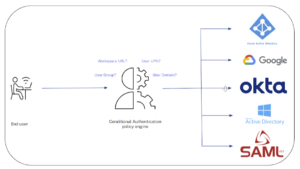
While NLS identifies the “where,” Conditional Authentication decides the “how.” It allows admins to direct users to different Identity Providers (IdPs) based on specific conditions.
Historically, Citrix Workspace was tied to a single IdP. With Conditional Authentication, you can now route users to multiple IdPs (Azure AD, Okta, SAML, etc.) within the same Workspace URL.
Key Policy Conditions
-
Network Location Name: This is where the magic happens. You can create a policy that says: “If the user is in the ‘Corporate Office’ network location, let them log in with standard Active Directory.”
-
Workspace URL: Route users based on which URL they use to access the environment.
-
User Group Membership: Different auth requirements for different departments.
-
UPN Suffix/Domain: Route users based on their email domain (perfect for M&A scenarios).
3. The Power of the Combo: Real-World Scenarios
When you link NLS to Conditional Authentication, you create a “Zero Trust” entry point.
Scenario A: The “Office vs. Remote” Flow
-
Condition: If Network Location = Internal_Office.
-
Action: Direct user to Active Directory (Seamless/Single Factor).
-
Condition: If Network Location = Undefined (External).
-
Action: Direct user to Azure AD with MFA enforced.
Scenario B: Blocking Untrusted Locations
You can create a “Catch-All” policy for any egress IP that does not match your defined NLS sites. For these “Undefined” locations, you can either redirect them to a high-security IdP or display a custom error message denying access entirely.
4. Better User Experience: Pre-Auth & Auto-Fill
One common concern with multi-IdP setups is “Home Realm Discovery”—how does the system know which IdP to send the user to before they’ve logged in?
Citrix solves this with a Pre-Authentication Page.
-
The user enters their username/email.
-
Citrix Cloud checks the Conditional Auth Profile.
-
The user is redirected to the correct IdP.
-
Login Auto-Fill: Citrix can automatically pass the username to the IdP (like Azure AD), so the user doesn’t have to type it twice.
Conclusion
The combination of Network Location Service and Conditional Authentication transforms Citrix Workspace from a static login gate into a dynamic, context-aware security perimeter. By defining your network boundaries and setting granular auth policies, you ensure that your data stays secure without placing unnecessary hurdles in front of your internal employees.
Ready to start?
-
Configure your Network Locations.
-
Set up your Conditional Authentication Profiles.